

Using AI, properly · 05: get started with MCP
Your AI is smart, and it can’t reach a single one of the real tools you use every day. An MCP server is the fix. We wire the two everybody already has, Gmail and Google Calendar, and they teach opposite halves of the same lesson: Gmail has no send tool; Calendar will happily delete an event. Where you draw the line depends on what you can undo.
TL;DR
Your AI is capable and stuck. It lives in a chat window and can’t reach the real tools you use every day, so it guesses from whatever text you paste instead of touching anything.
An MCP server is the fix: a small program that hands your AI a few tools to reach a real system. Any AI client that speaks the protocol can use them.
The example everyone has is Gmail. Connect your AI to a Gmail MCP and it can search your threads, read a message, draft a reply. It cannot send. That missing “send” is the whole discipline.
Google Calendar is the interesting counterweight, because it does let your AI write. It creates events, moves them, declines them. Same protocol, opposite posture, and the reason is not that email is precious. It is that a wrong event takes one click to undo and a sent email takes none.
Wire them both and the compound move shows up: find the thread, check the week, draft the reply proposing a real time. One sentence, three tools, two servers.
An MCP makes a system reachable. It does not do the work for you. Reachable is just where an AI stops guessing and starts being useful.
Last time, in context engineering, simplified, the whole piece was about what your AI knows: the goal, the real material, the boundary, all written down once so it stops guessing. This one is the half right after it, what your AI can reach, because knowing everything about your inbox is not the same as being able to open it.
your AI is stuck behind glass
Here is the problem, before we name the fix. Your AI is genuinely capable. It reasons, it writes, it plans, it can hold a hard problem in its head better than most people you have worked with. And it is stuck behind glass. It lives in a chat window, and from in there it cannot open your email, query your database, or look at your app’s numbers. It cannot touch a single one of the real systems you use every day.
So when you ask it something about your actual world, it does the only thing it can. It guesses from whatever you pasted into the box. Everything it knows about your situation, you typed in by hand. It is a brilliant advisor locked in a room with no phone: great judgment, zero reach.
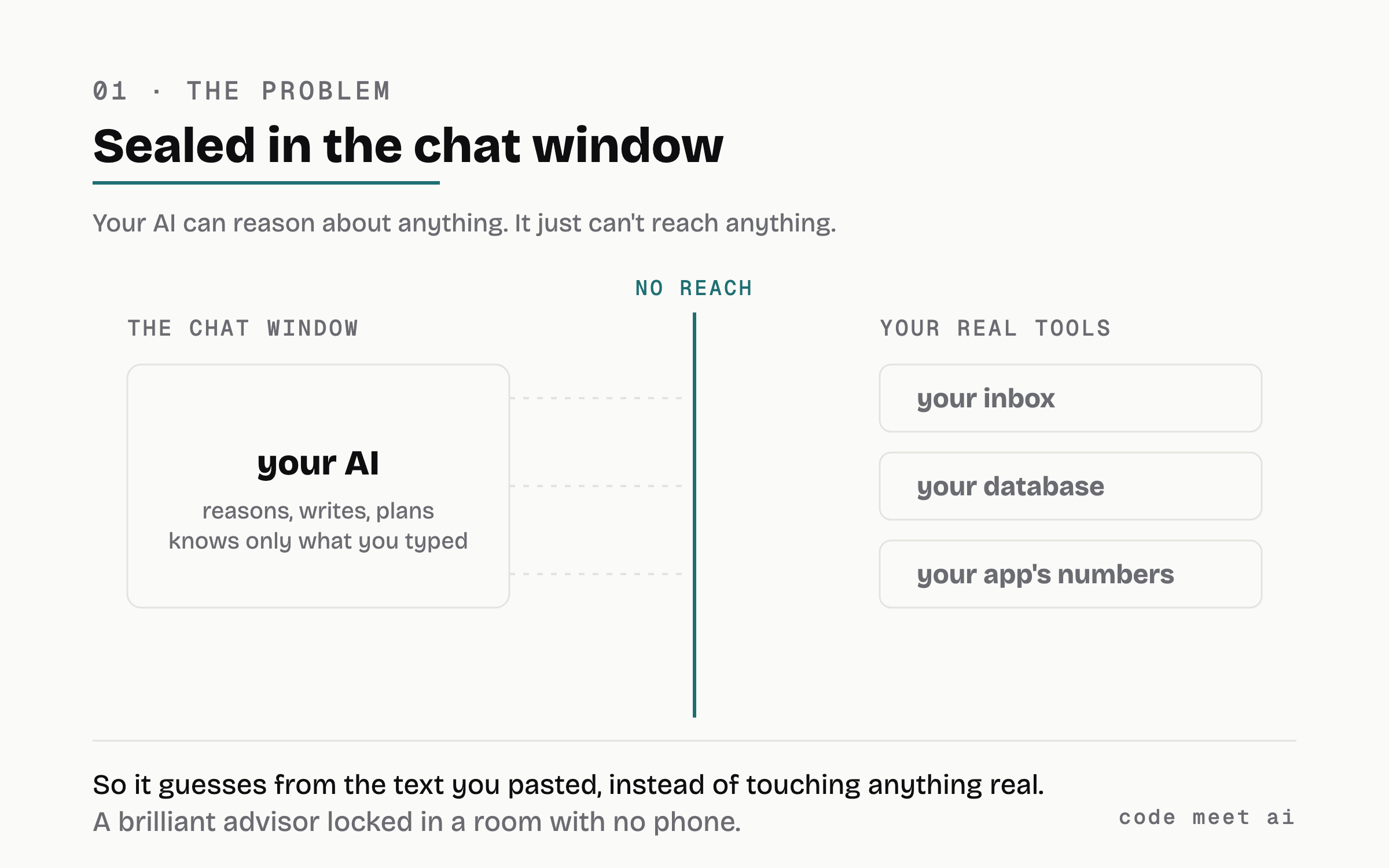
Your AI has great judgment and zero reach. Everything it knows about your situation, you typed in by hand.
That gap is the whole thing. Not “the AI isn’t smart enough.” It is smart enough. It just cannot reach anything, and until it can, every answer is a guess about a system it has never seen.
what an MCP server actually is
An MCP server is the phone in that room. Plain version: it is a small program that exposes a few tools your AI is allowed to call. MCP (Model Context Protocol) is just the shared plug shape, so any AI client that speaks it (Claude, Claude Code, Cursor, and a growing list) can use those tools without you writing custom glue each time.
A tool is nothing exotic. It is a named function with a description your AI reads, like search_threads → “search the user’s email.” Your AI sees the name, decides when it’s useful, calls it, reads the result, and reasons over what came back. You list which servers are available in a small config file your AI client loads. That’s the whole model.
Here is the honest part, up front, because the hype will tell you otherwise. An MCP server does not do the work for you. Connecting your AI to a system does not answer your email or fix your funnel. What it does is make the system reachable, so the distance between “i need to deal with this” and your AI actually helping collapses from a chore to a sentence. Reachable is where an AI stops guessing. Doing the work well is still on you.
One more distinction that trips people up: a skill is not an MCP. A skill is a folder plus a description that teaches your AI how to do something, knowledge sitting on disk. An MCP server is the other half: it gives your AI a hand to reach real, live systems. One is knowledge, the other is reach, and you want both. Context is what your AI knows. Reach is what it can touch.
the example everyone gets: wire your AI to Gmail
Everyone has an inbox, so let me make it concrete on the one system we all understand. Right now, in the session that wrote this article, my AI reaches my Gmail through an MCP server. It is not a diagram, it is how i actually work.
Connecting an AI client to a Gmail MCP hands it a small set of tools:
search your threads (
search_threads), so “find the last three emails from this founder” is one call, not a manual scroll.read a message (
get_message,get_thread), so the actual content lands in context instead of me copy-pasting it in.draft a reply (
create_draft), so the response gets written straight into my Gmail drafts, where i will actually see it.label and organize the rest.
Now the tool that is not there. There is no send. My AI can draft an email into my Gmail. It cannot send it. I open the draft, i read it, and i press send.
That is not a limitation someone forgot to fix. It is the discipline, drawn as a line. Search and read and draft are low-risk: worst case, a bad draft sits in a folder and i delete it, nobody ever saw it. Send is the irreversible one, the action you do not hand to a system that decides on its own when to act. So the boundary goes exactly there. Read-only first. The human keeps the send button. When you wire your own MCPs, that is the instinct to copy: give the AI everything up to the point of no return, and keep the last step yours.
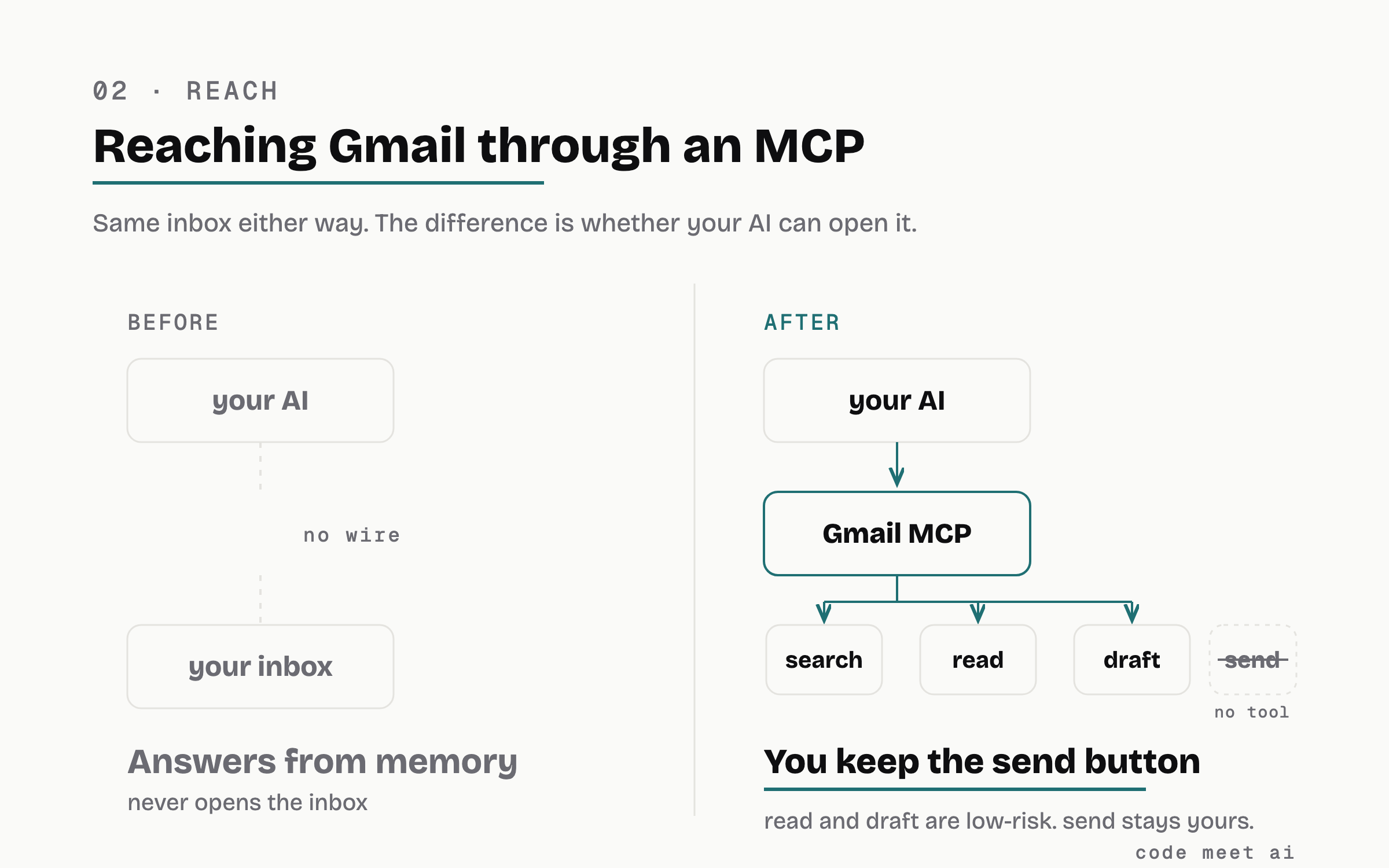
Same inbox either way. The MCP is what lets your AI open it, and the missing send tool is where the read-only-first line gets drawn.
This is also where the skill-versus-MCP split gets real. A skill can teach my AI how to write a good cold email: the tone, the structure, the one clear ask. That is knowledge. But knowledge with no inbox is a very confident guesser, writing to a thread it has never read. The Gmail MCP is the hand. It opens the actual thread, reads what the person actually said, and drops the draft where it belongs. The draft is any good because the MCP let the AI read the real conversation first, instead of me summarizing it into the chat. Knowledge plus reach.
And notice what the AI gets back when it reads a thread: the message as plain text it reasons over like a page, not a wall of raw API fields. That is the shape you want back from every server you wire, a page a model reads, not a dump it has to decode.
the second one: your calendar
Gmail teaches you where to stop. Google Calendar teaches you that the stopping point moves.
i wired my calendar the same way, same one-line config, and the tool list that came back looks very different:
read the week (
list_events,search_events,get_event), so “what does my Thursday actually look like” reads the real calendar instead of my memory of it.find a gap (
suggest_time), which hands back the slots that are genuinely open.write (
create_event,update_event,respond_to_event), so it books, moves, and declines.and
delete_event.
Read that last one again. There is a delete tool. After a whole section arguing for read-only, my calendar MCP can create an event, move it, and delete it, and i left all three switched on.
That is not me being inconsistent. It is the actual rule, which was never “read-only forever.” The rule is: give the AI everything up to the point of no return, and the point of no return sits in a different place for every system.
A wrong calendar event is a thing i delete in one click. Worst case somebody sees a placeholder for eleven minutes. A sent email is a thing i apologise for: once it lands in another person’s inbox there is no undo, no edit, no quiet fix. Same protocol, same config file, opposite posture. And the question that decides it is not “how sensitive is this data.” It is “if the AI gets this wrong, what does it cost me to take it back?”
Ask that per tool, not per server. That is the whole governance model and it fits in one sentence.
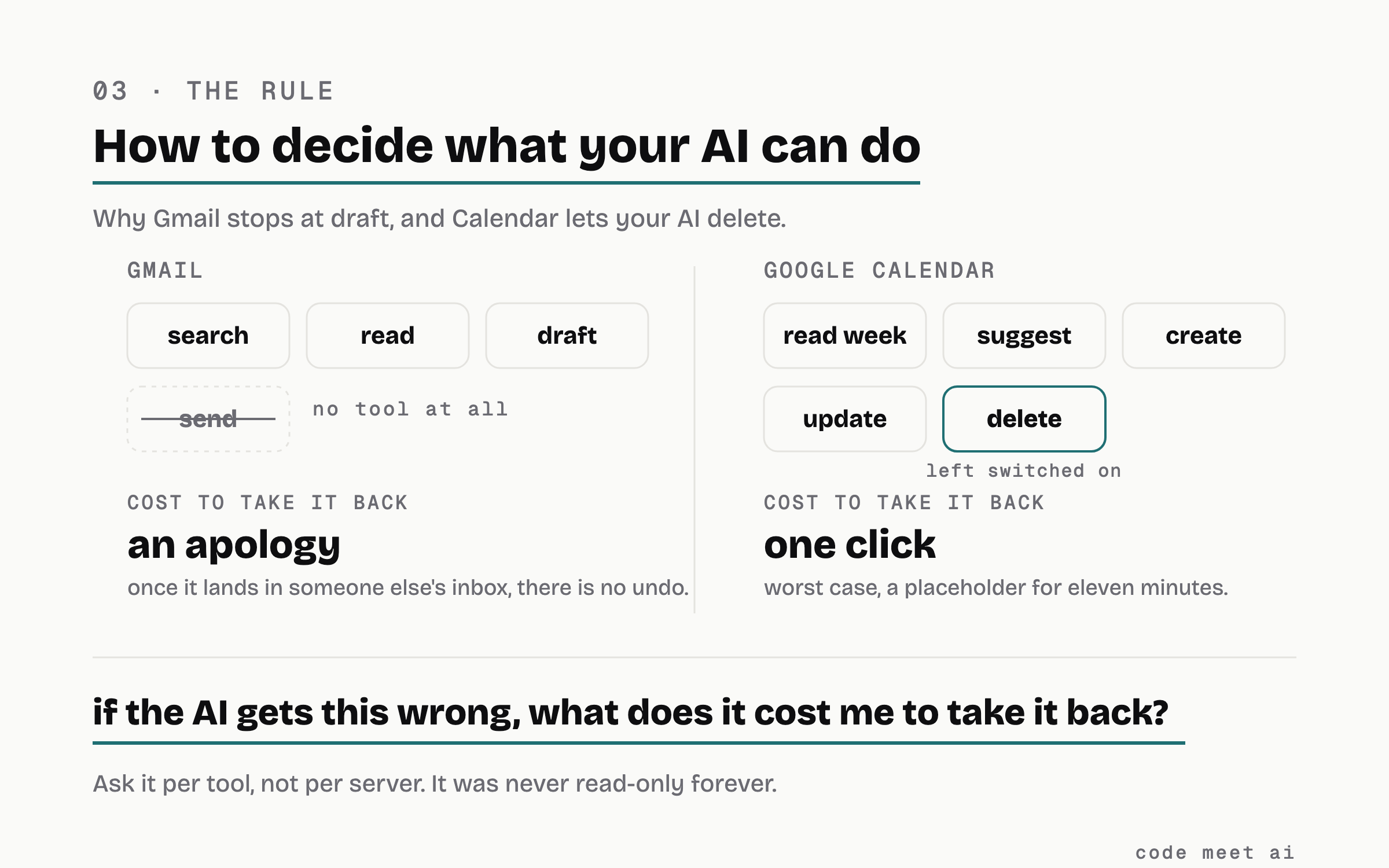
Same protocol, opposite posture. The line is drawn by what it costs to undo, not by how sensitive the data is.
Here is the part i did not expect. The calendar turned out to be the more valuable of the two connections, and not because of the booking. It is because the calendar is the only system that knows what my week really looks like. Before it was reachable, “when could i fit this in” was a question i answered by squinting at a grid and guessing. Now the answer accounts for the thing i personally keep forgetting: i work in Germany, the public holidays are regional, and the one that actually eats a week is the Brückentag, the bridge day between a Thursday holiday and the weekend where the whole country quietly stops answering email. i had to teach it that check once. What made teaching it possible is that the calendar was reachable at all.
the compound move, where it stops being a demo
One MCP is a convenience. Two is where the shape changes, because your AI can cross systems inside a single thought.
The real one, from this week: “find the thread where we were trying to book a call, look at my week, and draft a reply proposing two times that actually work.”
That is one sentence from me. Behind it: search_threads to find the conversation, get_thread to read what the other person already proposed, list_events to see what my week is holding, and create_draft to write the reply into Gmail. Four calls, two servers, and at no point did i copy anything out of one window and into another.
It still stops in the right place. The draft sits in my drafts. i read it, i press send.
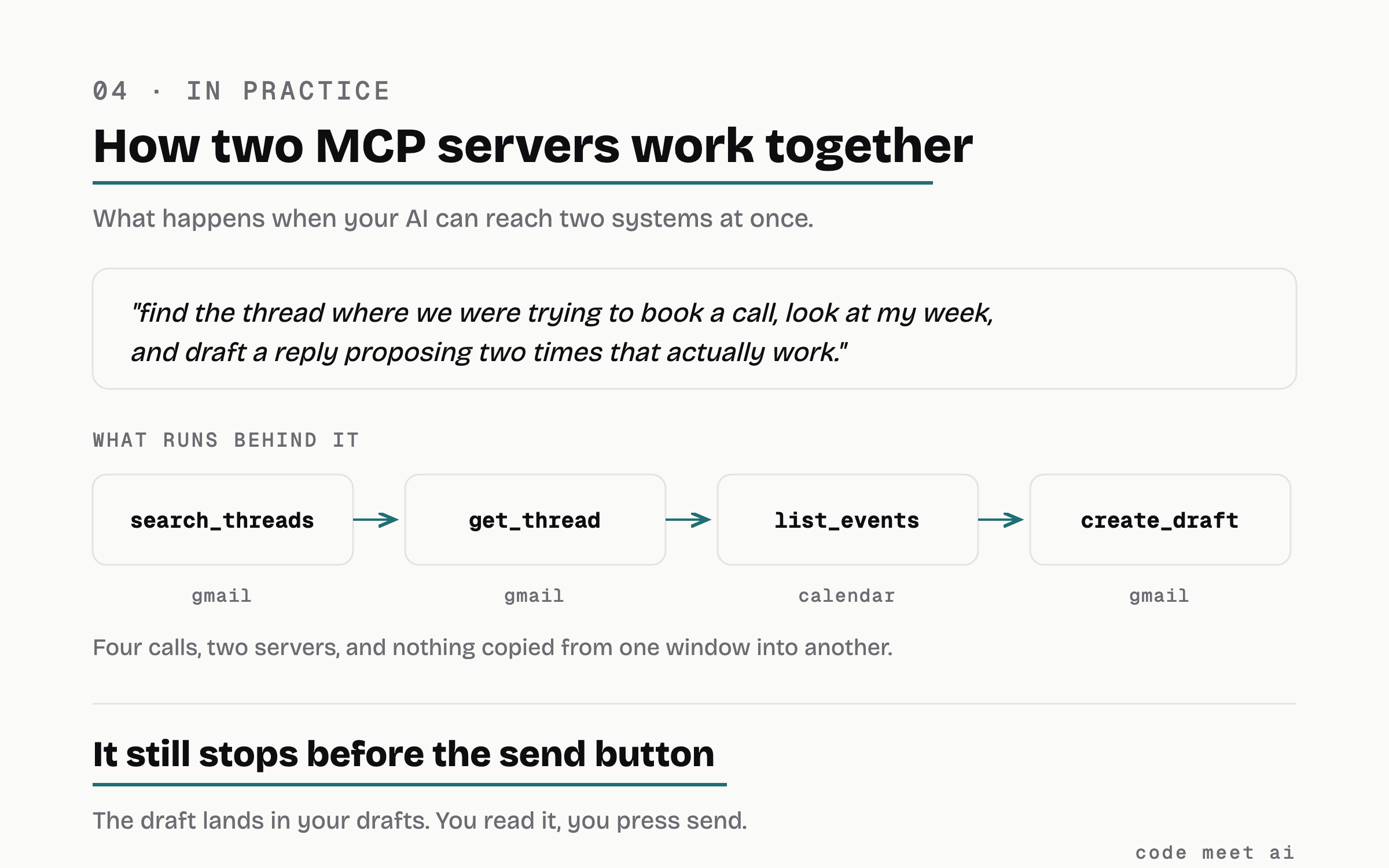
One sentence, four calls, two servers. Nothing copied from one window into another, and the send button is still yours.
And notice the small humiliation that does not happen any more. Doing this by hand, you propose a slot, they reply “you already have something then,” and you feel stupid. The AI is not smarter than you here. It just has both windows open, which you never do.
where reachable stops meaning good
Here is the limit, and it’s the same shape as every part of this series. Making a system reachable does not make it good. You can wire a flawless MCP to a terrible onboarding flow, or to an inbox full of emails you should never have sent, and the wire will not save you. Reachability only decides whether your AI can see the thing. Whether the thing is any good is still on you.
Which is the point. You don’t wire this up to feel finished. You wire it up so the next question, “why do people quit at step two, and what should i try?”, is one you can ask a system that can actually look, instead of one you answer alone, squinting at a dashboard you rarely open.
That is MCP. Two servers, one rule, and the rule moves per system. Follow for more, i write up the setups i actually run.
I’m Malik. I build with AI every day and write about using it well, minus the hype. This is part 05 of Using AI, properly. The Gmail and Calendar setups in here are both real, i use them to do actual work, and neither one does the work for me, they just put the systems where my AI can reach them. New parts land first in the newsletter at codemeetai.substack.com.
FAQ
What is an MCP server, in one sentence?
A small program that exposes a few named tools your AI is allowed to call, so it can reach a real system (your inbox, your analytics, your database) instead of only knowing what’s in the chat.
Does an MCP server do the work for me?
No, and be suspicious of anyone who says it does. Connecting your AI to Gmail does not answer your email; connecting it to your funnel does not fix your onboarding. An MCP makes the system reachable, so it collapses the distance between noticing something and acting on it. The acting is still yours.
What’s the Gmail example, exactly?
Connect an AI client to a Gmail MCP and your AI gets tools to search your threads, read a message, and draft a reply straight into your drafts. It deliberately has no send tool, so it drafts and you press send. That read-only-first boundary is the pattern to copy on every MCP you wire.
Why does the Calendar MCP get to write when Gmail doesn’t?
Because a wrong calendar event costs one click to undo and a sent email costs nothing less than an apology. The rule was never “read-only forever,” it is “stop before the point of no return,” and that point sits somewhere different in every system. Ask it per tool: if the AI gets this wrong, what does it cost me to take it back?
Do i need to build one from scratch?
Usually not. For common systems like Gmail or GA4 there are existing MCP servers you point at your account and configure in one file. You only write your own when the data lives behind your own API, and even then the minimum is one read-only tool.
Isn’t giving my AI access to real systems risky?
It can be, which is why you start read-only, allowlist exactly what each tool can reach, never put a secret or admin key in a tool’s output, and have missing credentials fail to “no data yet” rather than crash. Reading is low-risk. Let it write to anything real only when you’ve thought hard about it, which is exactly why the Gmail example stops at draft.
What’s the difference between a skill and an MCP server?
A skill teaches your AI how to do something, knowledge in a folder. An MCP server gives your AI a hand to reach live systems, so it’s reach, not knowledge. Most useful setups pair them: a skill that knows how to write a good reply, and an MCP that can actually open the thread and drop the draft.