

In the last one we talked about MCP, the plug that lets your AI reach a real tool like Gmail instead of guessing from a chat window. If you missed it, it is here: get started with MCP.
This one is the problem right after that. Once your AI can reach real things, you need a way to make it follow your rules.
Here is something that happens to everyone who works with an AI agent for more than a week.
You tell it a rule. Something like “always run the tests before you tell me you are done.” It does it. Good. Then three turns later, in the middle of a big task, it does not. You remind it. It apologises, does it, and forgets again two turns after that.
You did nothing wrong. The rule was clear. It just lost.
A hook is the fix for that. This is what one actually is, when each kind fires, and the five I run every day.
first, why the rule keeps getting skipped
Every rule you write into an instruction file has to compete for attention.
When a session starts, that file loads into the model’s context and stays there. So does everything else: the project structure, the task you asked for, every file it opened, everything that has happened since. On a short task your rule is easy to see. On a long one it is one line among thousands, and the model is busy.
So the rule is not “ignored” in any dramatic sense. It gets outvoted.
That is why “but I already told it” is such an annoying place to be. You did tell it. Telling is just the weakest way to make something happen.
so what is a hook
A hook is a small script that runs at a fixed moment, whether the model wants it to or not.
That is the whole idea. It is not text the model reads and weighs against everything else. It sits outside the model completely. The runtime calls your script, waits for it to finish, and reads what it gives back. If your script says no, the thing does not happen.
The model does not get a vote.
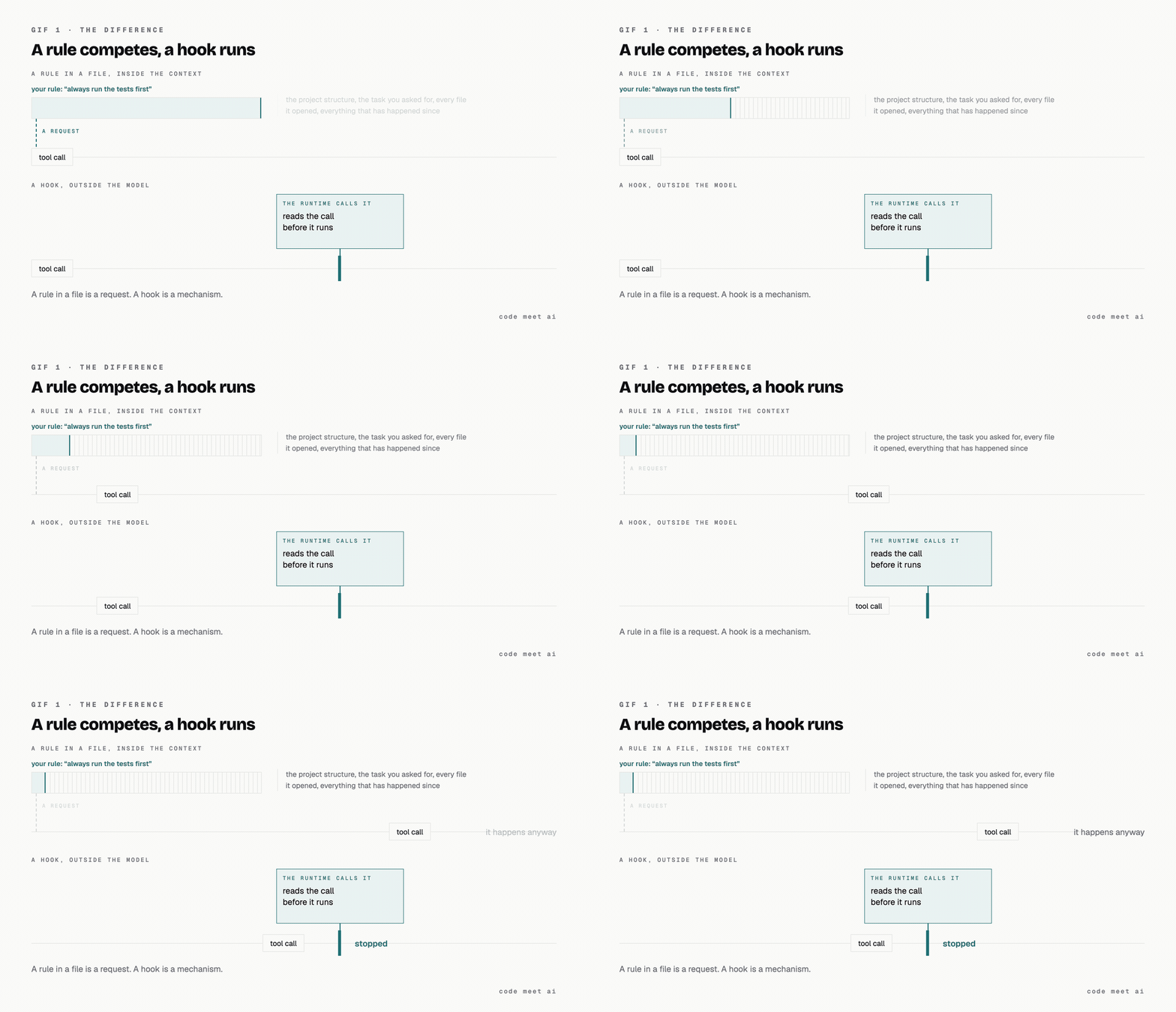
A rule sits in the context and competes with everything else in there. A hook sits outside it and runs anyway.
That is the entire reason hooks exist. A rule in a file is a request. A hook is a mechanism.
when they fire
A hook attaches to a moment, not to a file. Five moments matter, and picking the right one is most of the skill.
PreToolUse runs before the agent uses a tool, and it can stop it. This is the only moment that can stop something from happening.
PostToolUse runs after the tool call worked. It cannot stop anything, because the thing already happened. It is for catching, not stopping.
Stop runs once, when the turn ends. Once per turn, not once per action.
SessionStart runs when the session opens. Useful for loading something you always want in the room.
PreCompact runs before a long conversation gets summarised. Rare, but it is your chance to save something before it gets compressed away.
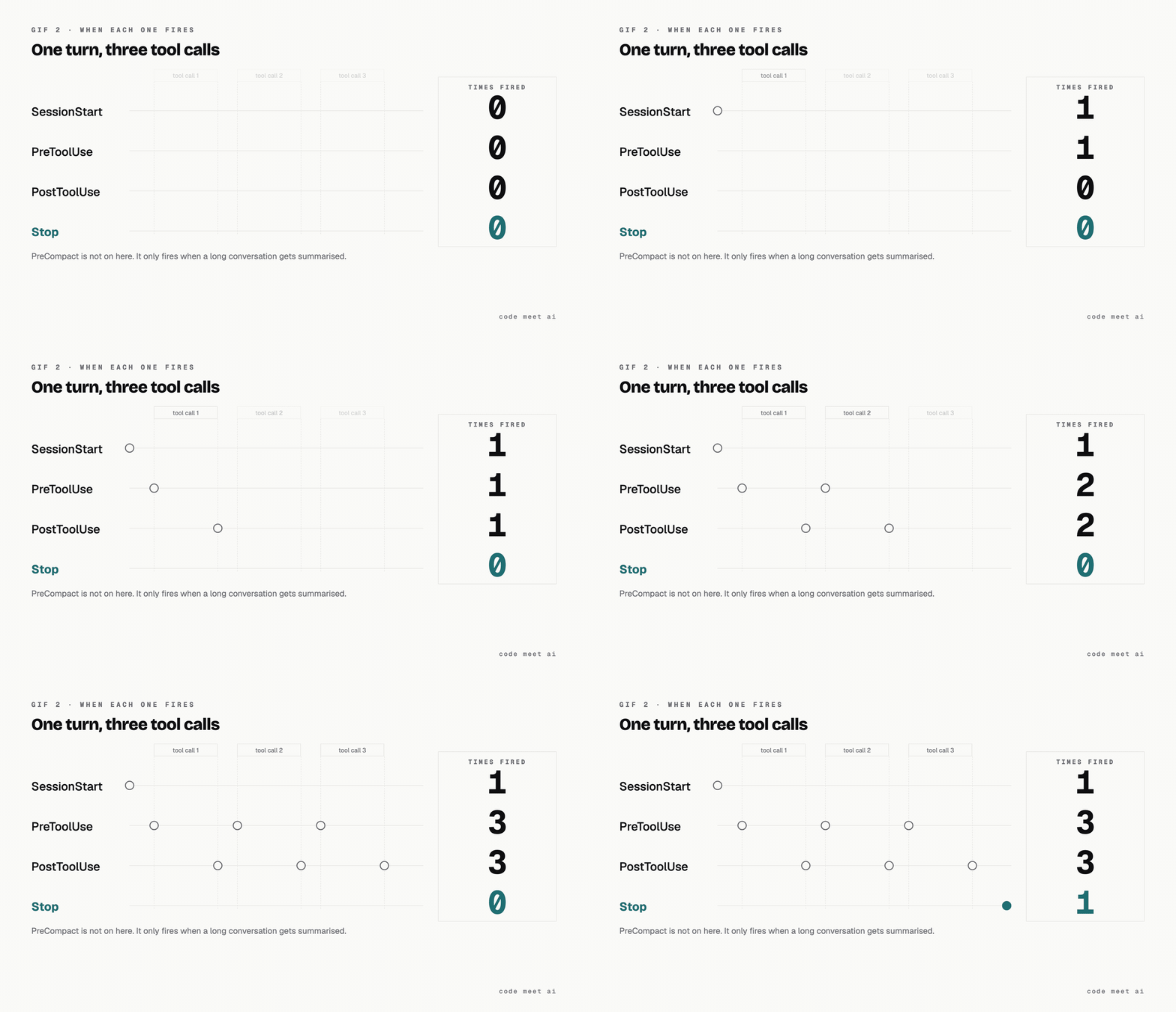
Pre and Post fire on every tool call. Stop fires once, at the end of the turn.
Almost everyone gets the third one wrong. If you want to check “did the agent skip the step it owed me”, that feels like a PreToolUse job, because that is where the action is. Put it there and it runs on every file read, every search, every edit, dozens of times a turn, to answer a question that has one answer per turn. It belongs on Stop.
the two jobs a hook can do
Once you know when it fires, there are only two things it can be.
A gate blocks. It sits on PreToolUse and stops the action. A gate has to be right every single time, because a gate that fires wrongly stops real work, and after the third false alarm you start working around it. That is worse than not having it at all.
A scanner catches. It sits on PostToolUse or on Stop and tells you what already happened. A scanner is allowed to be noisy, because being wrong costs you one line of reading.
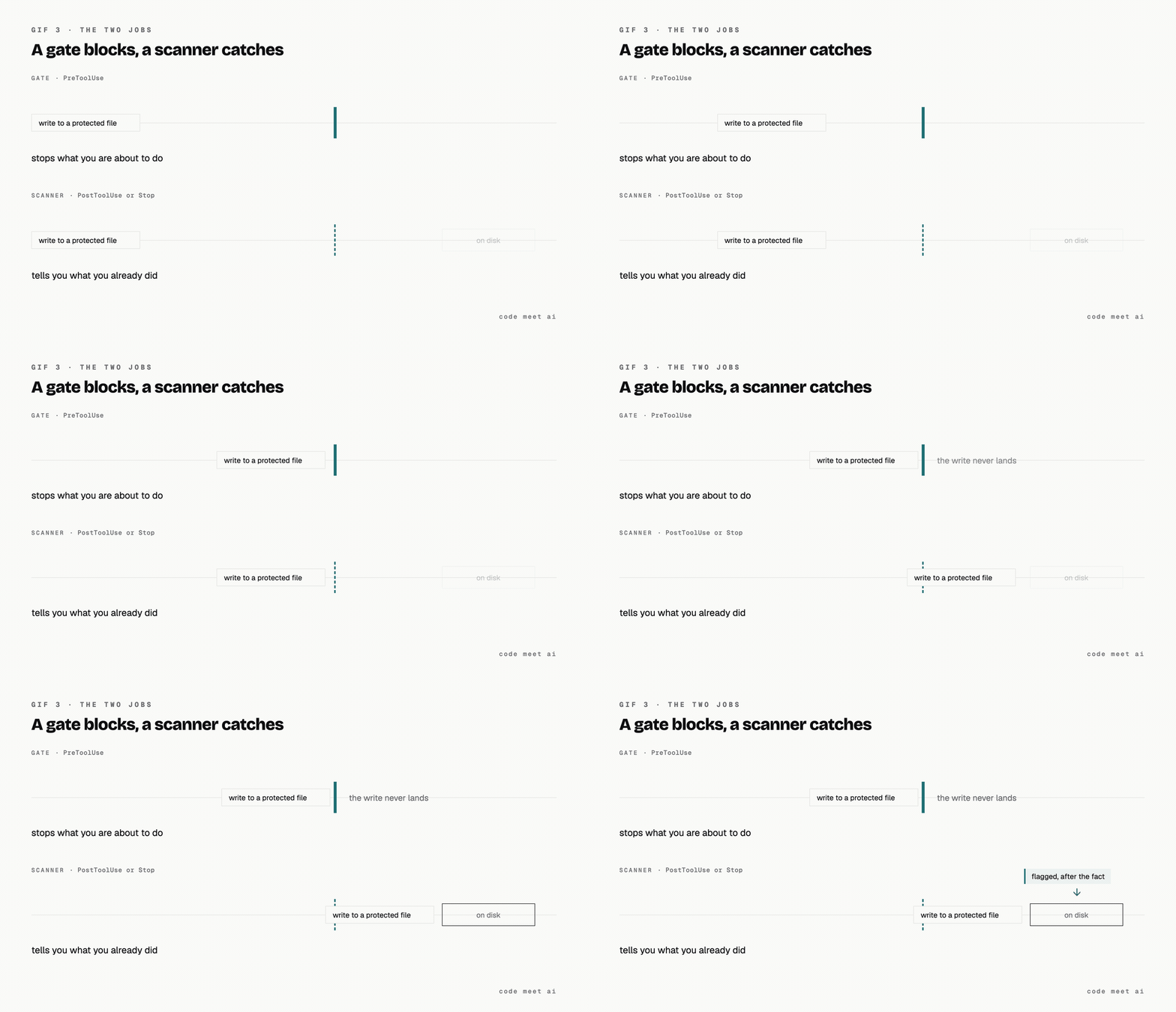
A gate stops what you are about to do. A scanner tells you what you already did.
People assume the gate is the serious version and the scanner is the compromise. They do different jobs. A gate protects you from what you are about to do. A scanner tells you what you already did and forgot about.
the five I run, and what each one is for
I keep my notes, my articles and my project state in one vault that AI agents write into every day. That is the thing these five protect. If you are building something similar, this is the shape it ends up taking.
skill-gate, a gate on writes. It refuses to let an agent write into a finished article until the editing pass has actually run in that session. I had this rule written in an instruction file for months, in capital letters, and it got skipped constantly. As a hook it has never been skipped once.
secrets-guard, a gate on shell commands. It reads the command before it runs and stops anything about to move a credential somewhere it should not go. This is the one I would build first, because getting it wrong once is unrecoverable.
no-add-all, a gate on shell commands. It blocks
git add -A. I usually have work in progress from more than one session, and one careless add sweeps somebody else’s half-finished changes into my commit.prose-slop-scan, a scanner on writes. After anything gets written it checks the file for the punctuation and vocabulary I do not want in published work. It cannot block, because the write already happened, and it does not need to.
manifest-path-lint, a scanner on Stop. When an agent hands me a summary full of file paths, this checks the paths actually exist. Once per turn, which is exactly the right frequency for a question about the whole turn.
Three of them block. Two only flag. None of them call a model, which matters for the reason in the next section.
The general lesson, if you take one thing from the list: the moment an agent starts writing into something you care about, requests stop being enough. You need enforcement.
how to see what you already have
If you have been using an agent for a while you may already have hooks you have forgotten about, and one of them may be firing on every single action. Start by listing them, not by writing new ones.
Table every hook configured for this session. Read the settings files that
apply (user level, project level, and any local override) and report, per hook:

- event (PreToolUse, PostToolUse, Stop, SessionStart, PreCompact)
- matcher, quoted verbatim (write MISSING if there is none)
- handler type (command or prompt)
- what it does, in one sentence
- how many times it fires in a typical turn

Then flag three things separately:

1. Every handler of type "prompt". Each one is a full model round trip.
2. Every matcher that is "*", empty, or missing. It fires on every tool call.
3. Every completion check sitting on PreToolUse or PostToolUse. Those
   belong on Stop, once per turn.
That first flag is the one that bites. A hook’s handler is either a command or a prompt. A command is a script, so it costs milliseconds. A prompt is a whole extra model call, every time it fires. Put a prompt handler on PreToolUse with a matcher that catches everything, and you have built a machine whose only job is to make your agent slow.
All five of mine are commands. None of them call a model.
where to start
Do not try to build the whole set. Pick the rule you are most tired of repeating and write the smallest script that checks it.
If getting it wrong would only waste your time, make it a scanner first and read its output for a week. If getting it wrong would cost you something real, like a leaked key, make it a gate on day one.
That is the whole decision. Everything after that is detail.
That is hooks. Follow for more, I write up the things I actually run.